Net de Tennis
Online
Requires Dreampi 2.0
Original game needed
Net de Tennis v1.004
GDI
Japanese.dcp
English.dcp

Patches and setup guides for Capcom's Dreamcast online games. New to .dcp patches? How to apply a patch
Every Capcom online game needs a CAPCOM ID. You register it once, in the game's network menu.
Example from Net de Tennis: go to NETWORK → BATTLE, choose AGREE, press A on the NET file screen, then choose NEW START.
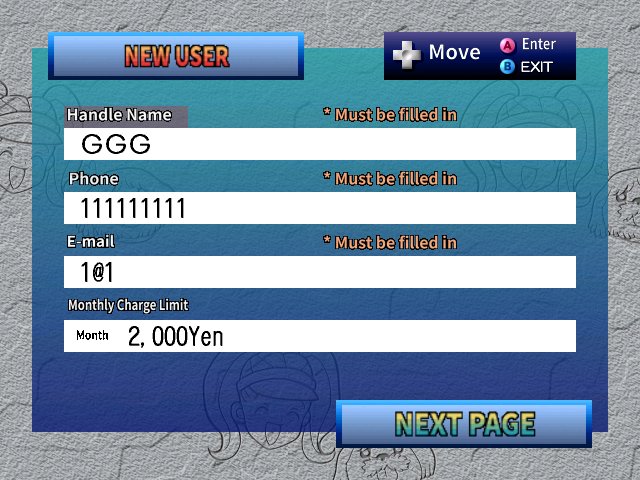
| Field | What to type |
|---|---|
| Handle Name | Your player name |
| Phone | Any numbers, e.g. 111111111 |
Must contain an @, e.g. 1@1 |
Press A on a field to open the keyboard, type, then select OK/Enter. Choose NEXT PAGE.
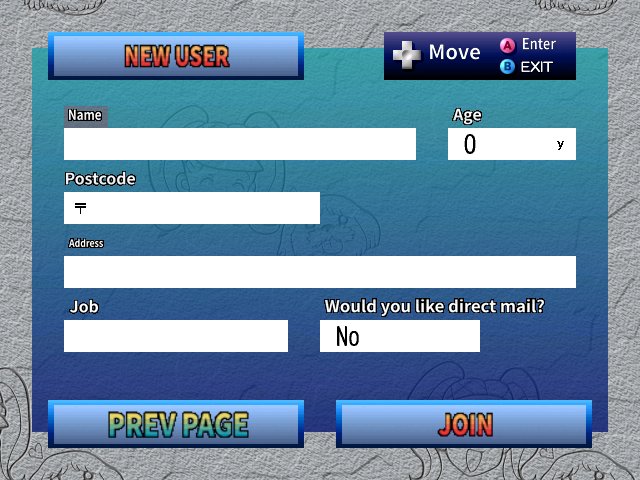
Leave everything empty. Choose JOIN, then Yes. Done!
Next time choose CONTINUE to log in with the same CAPCOM ID.
Screens from Net de Tennis; the registration looks the same in the other Capcom games.